When a fabrication job fails, operators typically look to the hardware first. They will spend hours recalibrating the Z-axis, tightening belts, and rebuilding the extruder assembly to fix sudden drops in surface quality. However, if the machine was operating perfectly the day before, the mechanical components are rarely the culprit. In the vast majority of cases, a sudden onset of stringing, poor layer adhesion, and fragile overhangs is caused by a chemical change in the raw material: moisture absorption.
Almost all thermoplastics used in desktop manufacturing are hygroscopic. This means they actively draw water molecules out of the ambient air and lock them into their polymer chains. Leaving a spool sitting unprotected on a desk for even a few days can completely alter its thermal properties. To maintain dimensional accuracy and mechanical strength, operators must learn how to identify moisture degradation, actively recover compromised materials, and implement strict storage protocols.
How Moisture Destroys 3D Printer Output Quality
To understand why wet plastic ruins a print, you have to look at the fluid dynamics inside the toolhead. Desktop fabrication relies on precise volumetric extrusion. The software calculates exactly how much pressure the extruder gears must apply to push a specific amount of melted plastic out of the nozzle.
Water boils and turns to steam at 100°C. Modern hotends operate anywhere from 200°C to 300°C. When moisture-laden plastic is fed into the melt zone, the trapped water instantly boils. The resulting steam expands rapidly and violently inside the confined space of the nozzle, completely destroying the controlled pressure environment. This manifests physically on the build plate in several distinct ways:
- Auditory Popping: If you stand next to the machine while it prints, you will hear a faint but distinct “crackling” or “popping” noise. These are microscopic steam explosions occurring as the water violently exits the nozzle.
- Severe Stringing: During a travel move, the extruder pulls the plastic backward (retraction) to prevent oozing. However, expanding steam ignores retraction. It forces molten plastic out of the nozzle while the toolhead is moving across empty space, leaving a mess of spiderweb-like strings across the part.
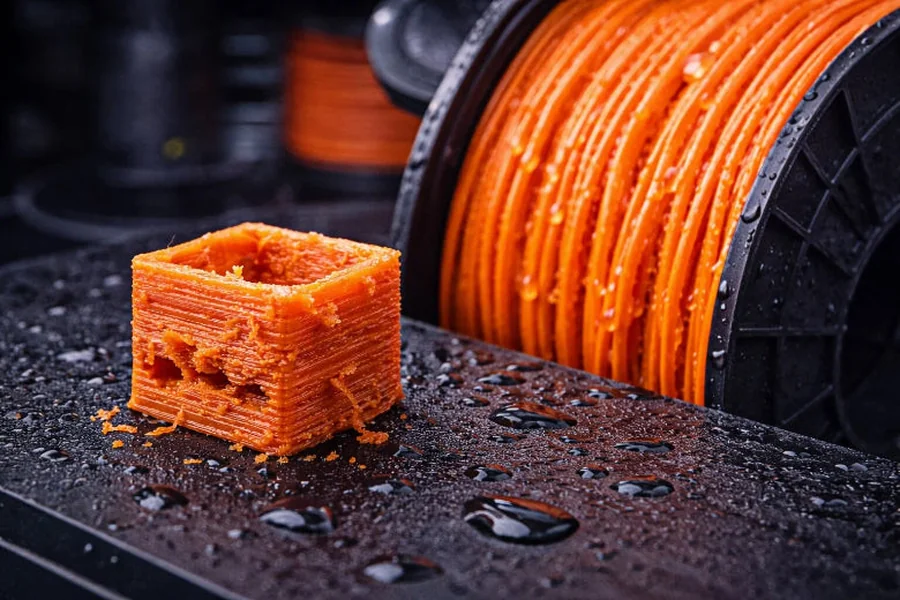
- Surface Pockmarks: As the steam bubbles burst through the outer walls of the print, they leave tiny, irregular craters and gaps. This completely ruins the smooth aesthetic finish of the object.
- Weak Layer Adhesion: Steam pockets create microscopic voids within the extruded lines. When the part cools, these hollow voids act as stress concentrators, causing the object to easily snap or delaminate under minimal physical pressure.
The Active Recovery Process: Baking Out the Moisture
If a spool exhibits these symptoms, the plastic is not ruined, but it cannot be printed in its current state. You must physically drive the water molecules out of the polymer matrix through sustained, controlled heating.
Feeding wet filament into the hotend is a guarantee of mechanical failure. To recover the spool, you must subject it to an environment that is hot enough to evaporate the trapped moisture, but cool enough to prevent the plastic from reaching its glass transition temperature. If you heat the spool too aggressively, the plastic will soften, and the strands will permanently fuse together on the roll.
Because different plastics melt at different thresholds, you must apply specific thermal recovery parameters. For a highly calibrated 3D printer to execute flawless toolpaths, the material must be dried according to its exact chemical profile.
| Material Chemistry | Sensitivity to Moisture | Target Drying Temperature | Required Drying Time |
| PLA (Polylactic Acid) | Low to Moderate | 40°C – 45°C | 4 to 6 Hours |
| PETG | High | 60°C – 65°C | 6 to 8 Hours |
| TPU (Flexible) | Extreme | 50°C – 55°C | 8 to 10 Hours |
| ABS / ASA | Moderate | 75°C – 80°C | 4 to 6 Hours |
| Nylon (PA) | Extreme (Fails in hours) | 80°C – 90°C | 12 to 24 Hours |
While standard kitchen ovens can theoretically reach these temperatures, they are highly discouraged. Kitchen ovens have massive temperature swings and uneven heating elements that frequently warp the plastic spools or melt the filament entirely. Dedicated material dryers or modified food dehydrators with forced-air circulation are the only reliable tools for maintaining the precise, low-heat environments required for recovery.
Preventative Storage and Workflow Solutions
Drying a spool is only half the battle. If you dry a spool of Nylon or PETG and then hang it on the side of the machine in a humid room, it will reabsorb enough moisture to ruin a print within 12 hours. Advanced manufacturing workflows require isolating the plastic from the environment permanently.
Implementing a strict material management system eliminates the need for constant recovery cycles:
- Active Dry Boxes: For highly sensitive materials like TPU and Nylon, do not simply dry them and remove them from the heater. Keep the spool inside an active, heated dry box while the machine is running. Feed the plastic directly from the dryer into the extruder through a sealed PTFE (Teflon) guide tube. This ensures the plastic is entirely shielded from room air until the moment it enters the hotend.
- Sealed Storage Totes: For standard materials like PLA and PETG, construct or purchase airtight storage containers featuring heavy-duty silicone gaskets. Standard plastic storage bins without rubber seals are useless, as air will easily pass through the plastic lid joints.
- Desiccant Management: Place bulk indicating silica gel beads at the bottom of your storage containers. Indicating silica changes color (usually from orange to green) when it is fully saturated with water. Once the beads change color, they can be baked in an oven to release the trapped moisture and reused indefinitely.
- Digital Hygrometers: Tape a cheap, battery-powered digital hygrometer to the inside of your storage boxes, facing outward. This allows you to visually verify the internal relative humidity (RH). A healthy storage environment should strictly maintain an RH of less than 20%.
Conclusion
Material chemistry is the foundational variable in desktop fabrication. You cannot compensate for wet plastic through software tweaks or hardware upgrades. By learning to recognize the visual and auditory signs of steam cavitation, actively drying compromised spools at the correct thermal thresholds, and enforcing strict, airtight storage protocols, you eliminate the most frustrating and common cause of print failure. Treating your raw materials with the same care as your mechanical components ensures consistent, high-strength manufacturing output.

Passionate about exploring diverse ideas and sharing inspiration, I curate content that sparks curiosity and encourages personal growth. Join me at ElementalNest.com for insights across a wide range of topics.