

Video production can include cameras, locations, lighting, performers, animation, editing, and reworking. These requirements can add to the cost of a project and to the time it takes for a project to be published. One way to do that is with Dreamina AI, which takes current visual assets and turns them into moving video. Its Seedance models create videos from the image references, and editing tools allow for further refinement. One creative environment is also used for image generation, video creation, and photo editing. But it varies based on the complexity of the project, generation attempts, finishing requirements, and resources. A lean workflow helps eliminate unnecessary work and maintain creative direction and quality.
Identify Which Production Tasks Image-to-Video AI Can Simplify
When it comes to visual tasks, AI-generated motion can make them easier to accomplish (without the need for new live-action shots). Rather than setting up basic product shots, old photos can morph into moving promos. Images of landscapes can be used to create atmospheric footage by using the generated movement and controlled camera effects. Campaign posters can come to life, but it takes careful examination of the text and branding. Initial animation concepts can be illustrated using characters, but it is difficult to get them to look the same. Several generations can experiment with ways to use the camera without going straight to specific filming. Longer concepts can include generated and extended clips as appropriate. However, for complex physical interactions, exact performances or special effects, filming, professional animation, or manual compositing may still be required.
Build a Lean Production Workflow Around Existing Visual Assets
The most efficient production starts with finding the right photos, illustrations, product images, posters, and brand-approved images. Choose pieces that convey the desired message with fairly straightforward movements. This is where the Image to Video generation comes in, enabling creators to turn their static content into video without needing to shoot new footage. Before generating, create prompts for the main action, direction of the camera, atmosphere, and visual style. Plan supporting texts and establish publication formats, aspect ratios, and resolution needs early. Before doing regeneration or targeted editing, check the first output. Preparation will not assure generation, but it will minimize duplication of effort and experimentation.
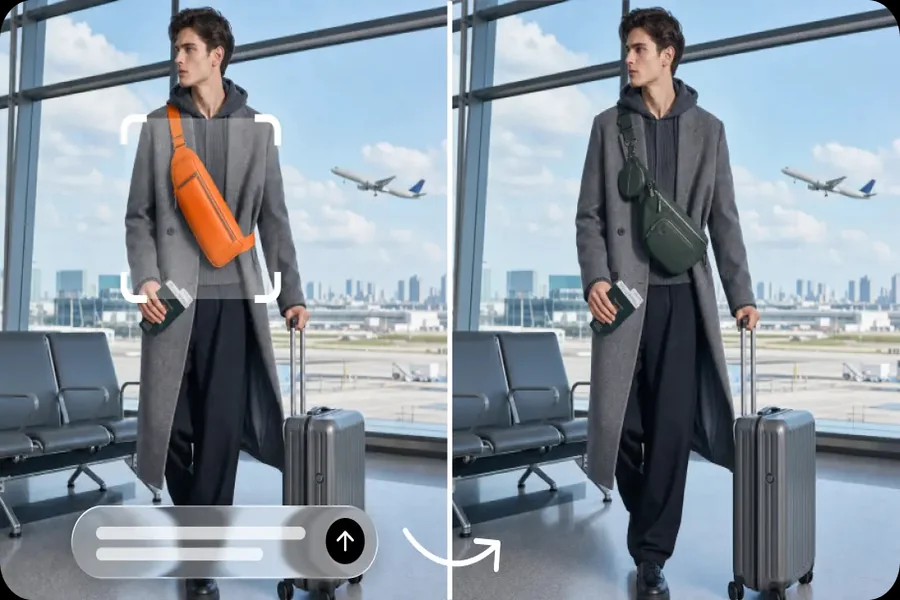
Steps to Cut Production Time and Costs Using Dreamina Image to Video Tool
Step 1: Set up your image and streamline video planning
-
First, sign up or log in to Dreamina to start turning existing images into videos.
-
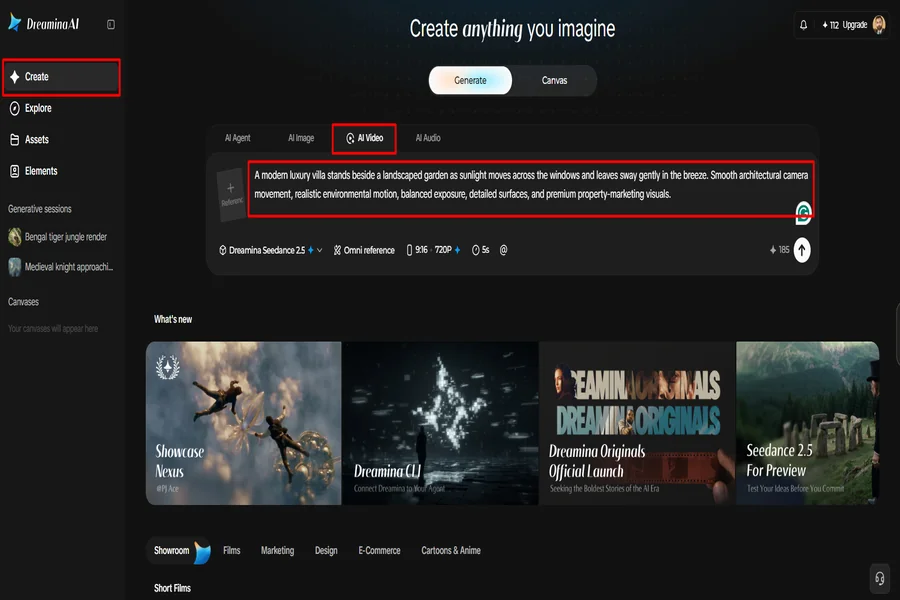
Next, select the “Create” tab from the left menu and open the “AI video” option.
-
Then, enter a detailed text prompt covering the video’s theme, concept, visual elements, and desired presentation.
Step 2: Configure generation settings and create your video
-
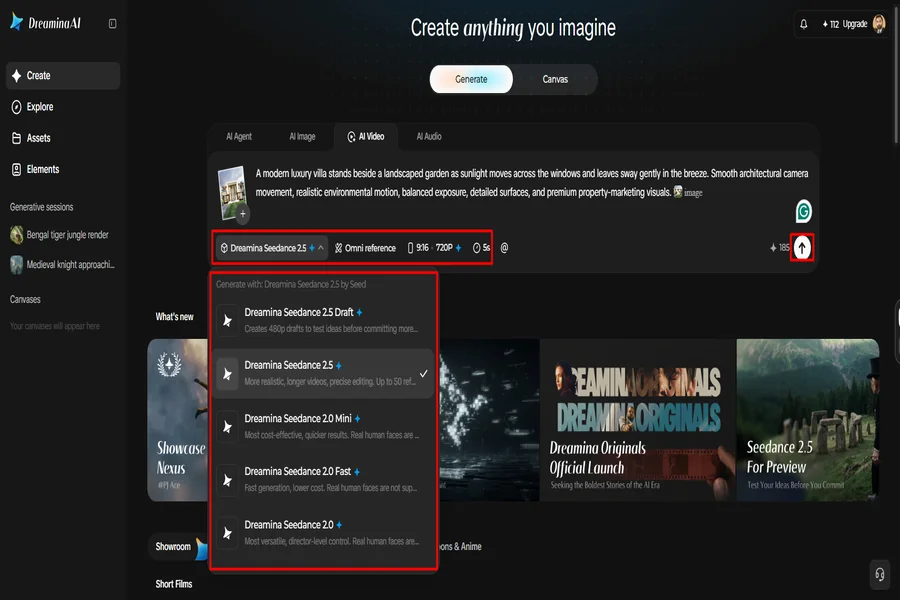
Choose a suitable model from the options displayed at the bottom of the dialogue box.
-
Dreamina offers models such as Dreamina Seedance 2.5, Dreamina Seedance 2.0, Dreamina Seedance 2.0 Fast, Dreamina Seedance 2.0 Mini, Dreamina Seedance 1.0, and others.
-
Select “Omni reference” to provide multiple reference images that guide the AI toward accurate video results.
-
Set your preferred video dimensions and output quality through the “Aspect ratio” and “Resolution” tabs.
-
Finally, click “Generate” to produce your video without starting the entire production process manually.
Step 3: Make targeted improvements and save production time
-
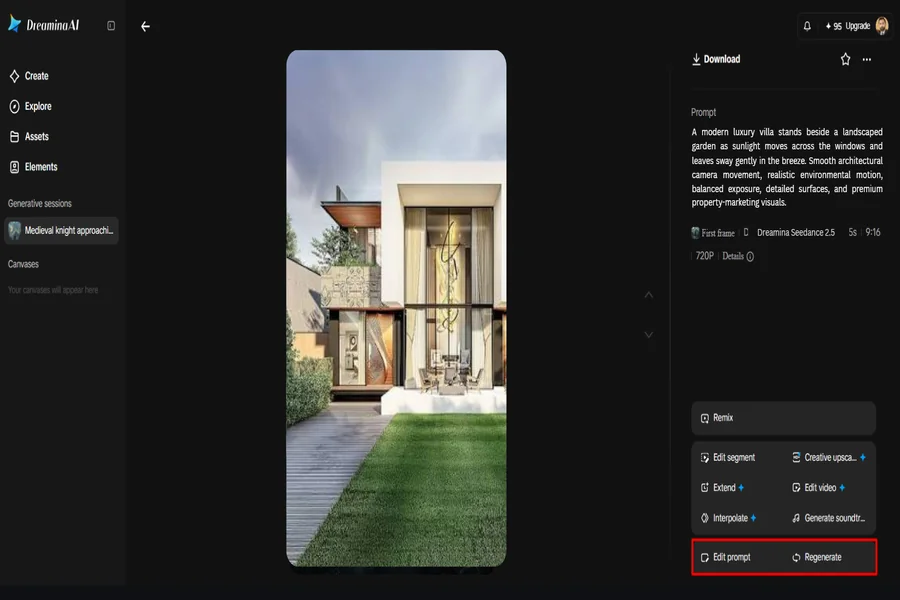
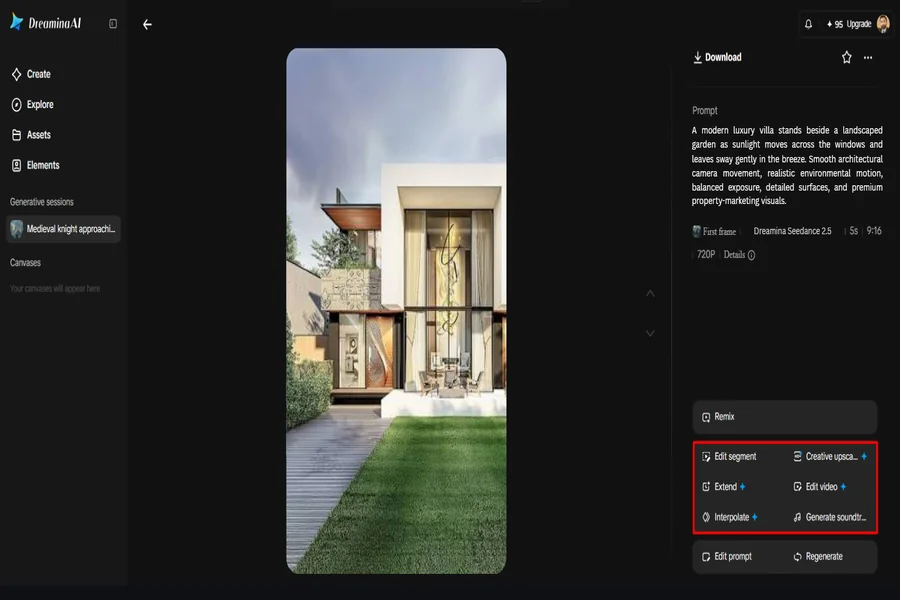
If the output needs improvement, select “Edit prompt” or “Regenerate” to refine the generated results.
-
You can also use “Edit video” to adjust your video without rebuilding the entire project from scratch.
-
Select “Edit segment” to revise only the portion requiring changes and avoid unnecessary adjustments elsewhere.
-
Choose “Extend video” to lengthen your footage or “Creative upscale” to improve its visual quality.
-
Dreamina provides flexible editing options that can reduce repetitive work, depending on your project’s complexity and requirements.
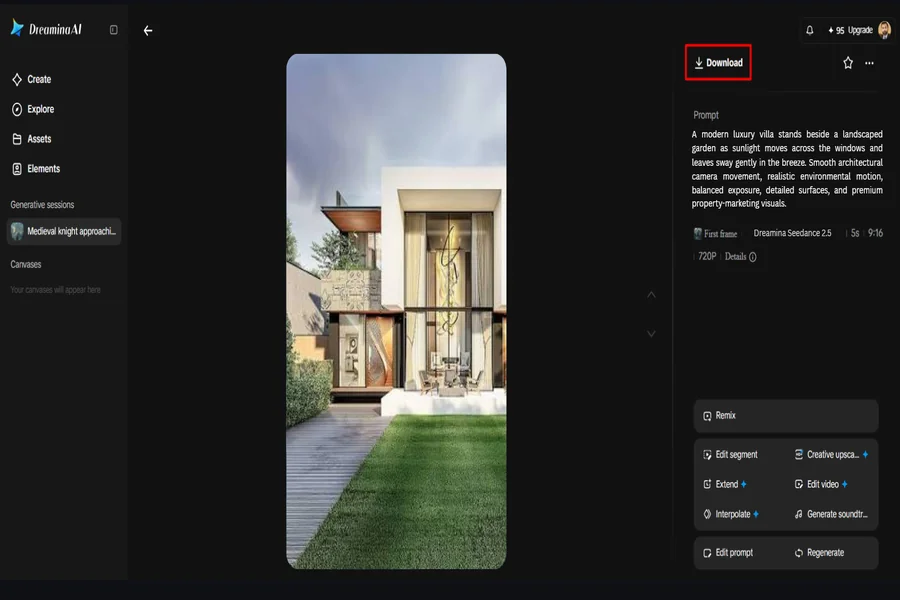
6. Finally, click “Download” in the top-right corner to save the finished video directly to your device.
Where Production Time Can Be Saved—and Where It Cannot
When the creative brief aligns with image generation, Dreamina AI can simplify a number of steps. These are some examples of opportunities where there is potential to save time and effort by changing workflows.
-
Asset preparation: Using appropriate images rather than making new shoots for each different appearance.
-
Concept development: Experiment with movement and visual treatments without investing resources into more complex production.
-
Motion creation: Make basic motion without having to build each frame of animation manually.
-
Revision management: Edit prompts or supported segments rather than automatically rebuilding the project.
-
Content adaptation: Create alternative versions of content using appropriate materials and resources for various publishing formats.
-
Quality assurance: Check anatomy, movement, branding, transitions, and technical requirements before publishing.
Generation waiting times, repeated attempts, manual finishing, and complex creative demands are still affecting turnaround. Automation does not eliminate all production responsibilities but only reduces certain tasks.
Control Production Costs With Better Decisions at Each Stage
The first step to cost control is to match the actual creative need to the method of production. When ideas do not require new physical footage, some reshoots can be eliminated by using existing photographs. The use of clear prompts will minimize the variation of unnecessary things, and the visual instructions will be more clear from the carefully prepared references. Localised defects can sometimes be corrected with a targeted edit, eliminating the need for another complete generation. Matching the duration and resolution to the delivery requirements also prevents unnecessary processing. Monitor subscriptions, credits, editing, review time, licensing, and other software costs. Please review Dreamina’s current account conditions, model access, credit allowances, and commercial-use terms prior to budgeting.
Extend the Value of One Visual Asset Across Multiple Deliverables
When several related deliverables are produced using the same image, it may be appropriate to have different versions of the image that are used for different purposes. Product photos can be transformed into video-based promotional material, and campaign artwork can aid in creating animated announcements. Variations of prompts can be used for alternative actions, atmospheres, and camera directions. Appropriate footage can also be modified to fit various aspect ratios and publishing venues. It is possible to identify character scenes related to the story, arranged in organized references (continuity will require checking). For longer sequences, clips can be generated and then edited appropriately. Before distributing, check all versions for cropping, readability, continuity, branding, and platform specifications.
Understand the Limits of an AI-First Production Process
Complicated interactions or quick movements may cause artifacts to be generated in the movement. Unexpected changes in product geometry, small text, logos, and fine textures may also occur. Finishing a project does not happen at the same speed as the generation of the project. Specialised filming or professional animation can give more control over precise performances and physical details. Obtain content from approved sources and ensure that permissions are confirmed before creating or publishing content. To ensure accuracy, continuity, visual quality, and delivery requirements, human review is still vital.
Conclusion
Dreamina AI can facilitate the creation of video content from images by repurposing resources and making certain production steps easier. The workflow is organised by means of focused prompts, suitable models, targeted refinement, and planned exports. Actual savings will vary based on a creative brief, resources, and finishing needs. Automate repeatable work and leave creative direction and accuracy to humans, plus the final quality.

Passionate about exploring diverse ideas and sharing inspiration, I curate content that sparks curiosity and encourages personal growth. Join me at ElementalNest.com for insights across a wide range of topics.