
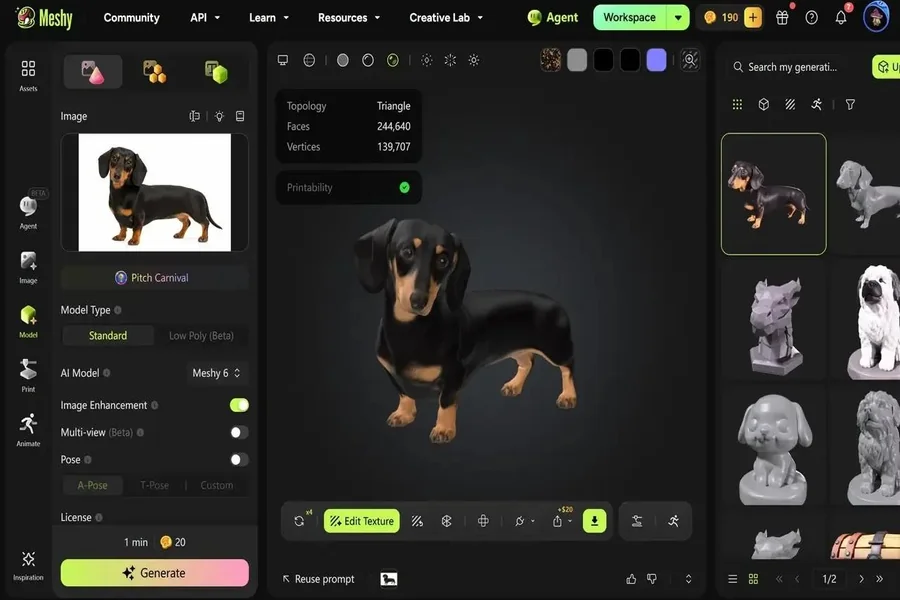
It takes hours for a small creative idea to become a usable 3D asset. You might have a clear vision of what a creature, product idea, prop or miniature should look like but, getting the mental image into geometry, typically involves special software and modeling skills. That’s not the way Meshy AI operates. Artificial intelligence allows creators to work from a starting point like words or images, and use AI to create a 3D model to be refined, textured, exported, or ready for further production.
One of the top AI 3D model generators, Meshy allows artists, developers, designers, makers and hobbyists to transition from concept to usable 3D model in their browser. It has a workflow that covers text-to-3D and image-to-3D creation, and other tools can be used for texturing, rigging, creating images, converting files and more in the 3D workflow.
What Is Meshy AI?
Meshy AI is an AI-powered 3D model generation platform designed to simplify the process of creating digital assets. Meshy does not need the user to actually sculpt every surface, make every polygon or use a high level modeling software, but simply give an instruction or a visualization reference.
The platform has two primary starting points: Text to 3D and Image to 3D.
Text to 3D is great for ideas that are primarily written. A creator can start a model by writing a description of a style of robot, medieval chest, fantasy creature, decorative lamp, or game prop.
For when a creator has a visual reference, Image to 3D may be a better fit. A picture, a concept picture, a sketch, or a reference can contain information which words do not convey.
Additionally, Meshy supports multi-image input, which can supply extra visual data for generating images. If multiple perspectives of an object exist, they can be useful in conveying the shape from varying angles.
Additionally, Meshy offers a free tier for those looking to try out the AI-driven modeling capabilities without the pressure of an upfront investment.Moreover, Meshy also provides a free tier, allowing users to explore the AI-enabled 3D modeling capabilities without the need for an immediate commitment to a professional 3D modeler setup.
Why Browser-Based 3D Generation Matters
The traditional 3D workflow is often complex, with a lot of applications, extensions, machines, and learning curve. The starting point is different when creating with the browser.
The first generation stage can be done in a traditional desktop modeling environment, but Meshy is completely browser-based, allowing users to work in the browser without starting a desktop application.
This can be especially beneficial for students, independent creators, marketers, educators, product designers, and hobbies that might not have much experience with 3D production.
The upside is that AI doesn’t replace all aspects of 3D modeling. Rather, it can shorten the time and cost gap between an idea and a first usable prototype.
A designer may be able to spend less time building one idea and more time determining if the idea is viable.
Three Practical Ways to Use Meshy AI
Here are three practical ways to use Meshy AI.
- Turn a Written Idea Into a 3D Concept
Suppose a game designer is designing an adventure game set in a forest. The designer must have a number of props to represent the environment, including an old lantern (of wood), a shrine covered in moss, and a fantasy treasure chest.
Rather than creating each object from a blank scene, the designer can start by using Text to 3D to create the objects he or she wants.
The models created can then be used as assets for concepts, prototypes or as a basis for further development.
This can be very helpful in early development when a group of people are interested in trying out a couple of visual directions within a short period of time.
- Transform Visual References to Models
Consider a product designer with a physical object on his desk and he would like to experiment with it as a digital asset.
Using a good image as a starting reference is possible with Image to 3D. Multi-image input can give other views, if more than one image are available, and it can help to convey the overall form of the object.
This makes this workflow useful for concept development, visualization, experimentation and some 3D printing projects.
- Prepare Models for Different Creative Workflows
Usually, a 3D asset won’t exist by itself. A game developer might want a model in one format and a 3D printing workflow, a different one.
Meshy can export almost every format, including STL, OBJ, GLB and FBX. This full export format coverage will allow you to create assets that are easier to move to other creative environments.
For instance, STL may be applicable to 3D printing pipelines, whereas GLB, OBJ, and FBX can be beneficial for pipelines in digital content and game development.
Beyond Generation: Meshy’s AI Tools
While creating a useful 3D asset, one important part is creating the model. Meshy AI has more features that work in conjunction with the steps that come after.
AI Texturing
The simple model can be a lot more useful if the surface of it is covered with the proper materials and visual detail. The AI texturing feature in Meshy can assist creators when it comes to applying textures to objects, reducing the need to paint each surface individually.
This is useful to try various looks at the same model.
Auto-Rigging
Another challenge is characters, when it comes to making a model ready for movement.
Meshy also features auto-rigging support to make compatible rigs for animation. This can make the process between modelling a character and trying movements much faster for game developers and for character creators.
AI Image Generation
Another feature of Meshy is AI image generation, which can be used to assist in ideation as well as 3D generation.
A creator can think up a visual concept first, then use appropriate imagery as a higher level part of a 3D creation process.
This makes it a helpful correlation of 2D experiments and 3D productions.
A Free Tool Suite for 3D Tasks
The 3D Tool Kit, which is available in the browser, is another highlight of the Meshy ecosystem.
This suite comes with utilities including a 3D Converter, Online Viewer and STL Repair.
These utilities are helpful if the creator has an existing file to deal with instead of creating a new model.
For example, if someone prepares a model to be 3D printed, he or she might have to fix an STL file before proceeding. It is also possible that another user might want to examine a 3D asset without the need of installing dedicated software.
It can be convenient to have these functions available in the browser, for everyday file handling.
How to Get Better Results From Meshy
Despite the advances of artificial intelligence generation, it still requires clear instructions. An ambiguous prompt might generate a piece that is conceptually similar to the prompt, but looks very different from what the author intended.
A better cue would be to describe:
The object’s type
Its overall shape
Materials
Surface appearance
Style
Proportions
Important design features
Intended visual character
For Image to 3D, it can also be helpful to have good reference images. When a shape is hard to decipher from one angle, using multiple images can be particularly helpful.
This is not the end goal of having a flawless final product on the first try. A better workflow is to create, test, tweak and repeat.
A Simple Meshy AI Workflow
Step 1: Create a Background Pattern
Decide on starting with a concept or with an existing image.
Text to 3D can be a great place to start if the idea is mostly verbal. If you have a good visual reference, you might want to choose Image to 3D.
Step 2: Generate the Model
Give the prompt/refer to an image and let Meshy build the initial 3D asset.
Now, concentrate on the general form and idea, not the first version, and don’t worry about perfecting every aspect.
Step 3: Review and Refine
Identify problems with proportions, geometry, materials and appearance.
If the result is not as expected, modify the description or reference and repeat the process.
Step 4: Add Supporting Details
Take advantage of AI texturing or auto-rigging features if appropriate for the project.
In some cases a character needs to be rigged, and in other cases, a static product visualization can be enhanced through better textures.
Step 5: Export the Asset
When the model is finished for the next step, export it to an appropriate format.
The support of STL, OBJ, GLB and FBX allows creators to flexibly move their assets from one application to another and into different workflows.
Meshy AI for Developers
Meshy doesn’t only work for manual workers in a browser.
The developer API access enables teams to incorporate AI 3D generation into their very own app and workflows. This can be useful for companies that wish to embed text to 3D, image to 3D or AI-related features into a product, but don’t want to have to train each user to operate them directly within a computer program.
Meshy AI can thus serve as more than just a creative environment for developers delving into AI-driven 3D workflows. Its API access opens up opportunities for its automated generation and custom applications.
For instance, a development team may create a workflow where user-defined descriptions are used as input for the automatic creation of 3D assets. Regardless of how it’s implemented, the idea is simple: bring AI 3D generation into the applications users are already using.
Who can Benefit from Meshy AI?
There are multiple creative and technical applications for Meshy AI.
Developers can use generated assets during game development for prototyping environments, props, and characters.Developers can utilize generated assets during game development to prototype environments, props, and characters.
The 3D printing enthusiast can develop ideas, and create models which can be exported for further processing.
AI-generated objects can be utilized during concept exploration by designers.
Teachers and students can play around with 3D creation without having to start from a high level modeling process.
Independent producers can take ideas, build visual assets without having to create all of the models by hand in the browser-based environment.
The common denominator is speed of exploration. If it’s easier to make an initial model, then the creators can try more ideas before choosing those they feel are worth putting the time and effort into creating a detailed version.
Frequently Asked Questions
Is Meshy AI free?
The free tier is another advantage of Meshy, as users can experience the AI capabilities of the 3D generation without the need for a paid subscription.
Can Meshy create 3D models from text?
Yes. Text to 3D is a benefit of Meshy that lets users input a text description of an item or concept, and Meshy generates an equivalent 3-D model.
Is it possible for Meshy to convert an image into a 3D model?
Yes. Meshy is compatible with Image to 3D. It also enables multi-image input, which provides the additional visual reference for the generation.
What are the file formats Meshy can import?
Meshy can use the most popular formats such as STL, OBJ, GLB, and FBX, allowing users to export assets in various formats based on their specific workflows.
Are there tools that Meshy doesn’t have to make 3D?
Yes. It has a suite of tools that can be used in its browser, including 3D Converter, Online Viewer, and STL Repair. Apart from AI image generation, Meshy also has features such as AI texturing, auto-rigging, and more.
Can the developers integrate Meshy in their own application?
Yes. For developers seeking to integrate AI-powered 3D generation into their applications, products, or automated workflows, Meshy offers API support.
Final Thoughts
While AI is transforming the 3D production landscape, perhaps its greatest appeal to creators is that it allows experimentation to be easier. Rather than starting with a 3D model, users can start with an idea, image, or vague concept and build it up into a tangible 3D model.
The Text to 3D, Image to 3D, multi-image input, AI texturing, auto-rigging, AI image generation, STL, OBJ, GLB, and FBX export, as well as a collection of useful 3D tools for free, are all part of this approach that Meshy AI brings to a browser environment.
Whether it be to create a game, design project, 3D print or any other type of digital creation, Meshy is a practical solution to get creators from idea to a usable 3D asset in no time.

Passionate about exploring diverse ideas and sharing inspiration, I curate content that sparks curiosity and encourages personal growth. Join me at ElementalNest.com for insights across a wide range of topics.