
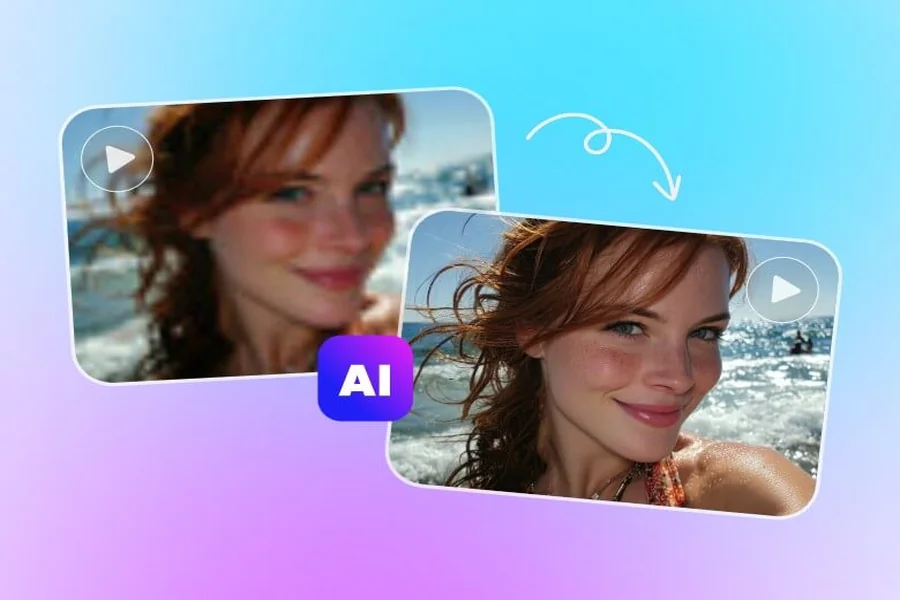
Video is an important component of contemporary communication, whether it is social media posts or online tutorials, business presentations, and educational materials. Nevertheless, it is not always simple to produce a quality video. Videos shot on outdated cameras, compressed media, low-quality lights, and low-resolution cameras may have an effect on the end product. With the growing demands of audiences to have clear and professional visuals, content creators are seeking realistic means to enhance their videos without necessarily spending a lot on equipment.
A convenient option is to upscale video using artificial intelligence. Video upscaling based on AI can enhance the perceived quality of low-resolution images by examining image details and creating higher-quality frames. This facilitates easier adaptation of existing clips to contemporary screens, social media and other digital platforms by creators without necessarily having to record everything anew.
Why Video Resolution Matters
Video resolution is the amount of visual information that an image can show. The most popular ones are 720p, 1080p, and 4K, and higher resolutions tend to be more detailed as long as the source content can support it. Low resolution can be fine on a small mobile phone screen but see pixelated or blurry on a bigger monitor or TV screen.
The problem of resolution is especially significant to enterprises and creators who utilize the same content in various platforms. A product demonstration made several years ago, say, may include some useful information, but it may not be as visual as it could be nowadays. Enhancing the footage can make the content more acceptable to the contemporary viewers.
Resolution, however, is just one aspect of video quality. The end results are also affected by lighting, focus, color balance, compression and stability of the camera. These factors should be considered in effective enhancement instead of the sole attention on the increase in the number of pixels.
How Artificial Intelligence Enhances Video
In traditional upscaling, a video is increased in size by interpolating with new pixels mathematically. Though this method can enhance the output resolution, it might not be effective in restoring the lost details. Edges may be soft and objects may be obscure.
AI-based improvement follows a new direction. Artificial intelligence may infer other visual details depending on the tool used and the model on which it is based, by examining patterns, edges, and textures and relationships between frames. This procedure can result in sharper images and enhance the viewing process.
Certain tools also provide the ability to reduce visible noise, enhance contrast or fix some flaws in the image. The outcome will be based on the quality of the original video and the features of the software. Even heavily blurred or damaged recordings might still be limited since AI is not able to reliably reconstruct all the details that were never recorded.
Practical Ways to Improve Video Quality
It normally takes more than the choice of an enhancement tool to get better results. Considered workflow can assist creators in getting a cleaner and more coherent end product.
- Start With the Best Available Source
Avoid using a copy of a video on a social media site, whenever you can. Compression may cause fine details to be lost and creates visual artifacts when repeated. The starting point of a more quality source provides enhancement software with more information to work with.
- Select Appropriate Enhancement Settings
Various clips need different alterations. A grainy recording can be improved with noise reduction, and a recording with smooth edges can be sharpened or upscaled. The use of all the possible additions in full vigor may lead to unnatural textures, halo, or overemphasized details.
Processing a complete video can be facilitated by testing a small part of it first. By comparing the original and the enhanced versions, one will be able to more easily judge whether the changes are really beneficial to the footage or not.
- Take into account Lighting and Color
Dark shots are possible with noise, and excessively bright shots can lose detail in bright areas. These problems can be corrected by color correction, to make the look more consistent. Nevertheless, over-saturation or contrast can cause a video to appear natural.
The creators are advised to strive to achieve the use of natural colors that are appropriate to the subject and style desired. The interviews, product demonstration, travel video, and cinematic work might need a varying visual approach.
- Export the Right Settings
Even an improved video may be of poor quality when exported improperly. The creators are supposed to choose the destination platform-appropriate resolution and select a suitable bitrate. The higher bitrates will tend to retain more detail, but the file size is also larger.
It is also important to maintain a suitable frame rate. Resolution alone is not a direct proportionality to make movements more smooth, and varying the frame rate can change the images unwantedly.
Where Video Upscaling Can Be Useful
AI video enhancement can be used in various industries and types of content.
Social media content: Producers can enhance older posts prior to inserting them into new posts, short videos, or advertising campaigns. Enhanced video can also be used to ensure that the style of video remains the same throughout a profile.
Education and training: Schools, teachers, and companies might possess valuable recordings which were recorded using older cameras. It is possible to improve these materials and simplify their viewing on the existing devices, especially in the case when the demonstrations include minor visual elements.
Marketing and e-commerce: Companies tend to recycle product video in advertisement, landing page, and online shops. Enhancing the visibility of the available footage can assist them to make their content libraries last longer.
Personal archives: Videotaped family records, memories of travels, and older event videos can be improved with careful consideration. The outcomes will be different, yet AI tools can assist in making some clips more comfortable to view on contemporary screens.
Professional video production: Upscaling can be a part of a bigger post-production process that involves editors. It can particularly be useful when the footage of various cameras has to appear more coherent in one project.
Common Mistakes to Avoid
The common trap is that when the resolution is increased, it is also assumed to be good. A 4K video exported can still appear bad when the original video is grossly out-of-focus or badly compressed, or when the original video is very poorly focused. The choice of resolution should be made based on the desired usage and the quality that can be realistically obtained.
Another mistake is applying too much sharpening. Over sharpening may result in sharp edges around objects and unnatural appearance of the skin, hair and other textures. Indirect manipulations tend to be more believable.
The last viewing environment should also not be overlooked by creators. A mobile screen video might not have the same export settings as a presentation that is to be displayed on a big screen. The final file can be tested on the target device to uncover problems that can not be clearly seen during editing.
Last but not least is privacy which should be considered in online enhancement services. Users are advised to read the privacy policy, file-handling of the service and read the terms of data retention before uploading sensitive footage.
The Future of AI Video Enhancement
Video editing is becoming more accessible due to artificial intelligence, which minimizes technical knowledge to perform most of the routine adjustments. Previously tools that required the use of specialized software and a lot of manual labor can now provide a smooth workflow to creators, small businesses and casual users.
The future could offer finer reconstruction of details, enhanced stability of motion, increased noise reduction, and more edit controls. Meanwhile, quality will still be subjective to the material used, the model selected and the discretion of the user.
The improvement of AI can be regarded as a practical support instead of a good replacement of proper recording methods. Good lighting, steady camera work, correct framing and editing are also vital pillars of what can be termed as professional appearance.
Conclusion
High-quality video helps creators communicate ideas, present products, and preserve important moments. Where the available footage is below current viewing standards, AI-based improvement can offer an easy solution to make it look better without having to begin anew.
With the right source file, careful balancing of adjustments and proper exporting with the appropriate settings, users can make more effective use of their video libraries. Intelligent tools and realistic expectations and a cautious attitude towards visual quality are the best combinations.

Passionate about exploring diverse ideas and sharing inspiration, I curate content that sparks curiosity and encourages personal growth. Join me at ElementalNest.com for insights across a wide range of topics.