You have ideas for a lifestyle account: a relaxed weekend outfit, a reading list, a cosy corner or a simple creative project. You can picture the mood and the story, but you may not want to photograph your home or appear on camera every time you post. How can you turn those ideas into a series people recognise?
An ai influencer can give your content a recurring virtual host. With Dreamina, you can develop a character from a written description or an authorised photo reference, save it for reuse and explore images and videos in different settings. The creator remains responsible for the ideas and facts; the virtual character provides another way to present them.
A lifestyle account can cover personal style, reading, home inspiration, hobbies or imagined travel scenes. Begin with a subject you enjoy and build a small series around ideas your audience can use or explore.
Choose a lifestyle subject you can explore
“Lifestyle” is a broad starting point. A clearer focus can make it easier to decide what to create and help viewers understand what they will find on the account.
A style account might explore colour and layering. A reading account could introduce book-related prompts. A creative-hobbies account might share sketchbook ideas, while a home-inspiration account could explore different visual directions for a small space.
Imagine a fictional virtual host called Sol, created for an account about simple creative hobbies. Sol might introduce a weekend sketchbook prompt, share an imagined desk setup and ask readers what colours they like using. The host is fictional; the creator chooses and checks the ideas behind each post.
Write down three questions that belong to your topic. For a reading account, they might be: “What should I read when I have only ten minutes?” “How can I choose my next book?” and “What makes a good reading list?” A question gives each post a purpose beyond showing another attractive image.
Design a host that fits the account
The character does not need an elaborate biography. Choose a few visual details that fit its role and make it recognisable across a small image or short video.
For Sol, those details might be short dark hair, a soft blue jacket and a sketchbook. An illustrated style could suit the creative-hobbies theme, while a fashion account might explore a different visual approach. Think about the mood you want the account to convey and where the character will appear.
A starting brief could say: “Create an original illustrated lifestyle host for a creative-hobbies series. Short dark hair, soft blue jacket and a sketchbook; warm natural light; calm editorial style. Leave space beside the character for a short title.”
Review a few drafts and choose the one that communicates the idea most clearly. Save the character for reuse and keep a note of the features you want to recognise later. If you start with a photo reference, use one you own or have permission to upload and adapt.
Turn a single idea into a useful post
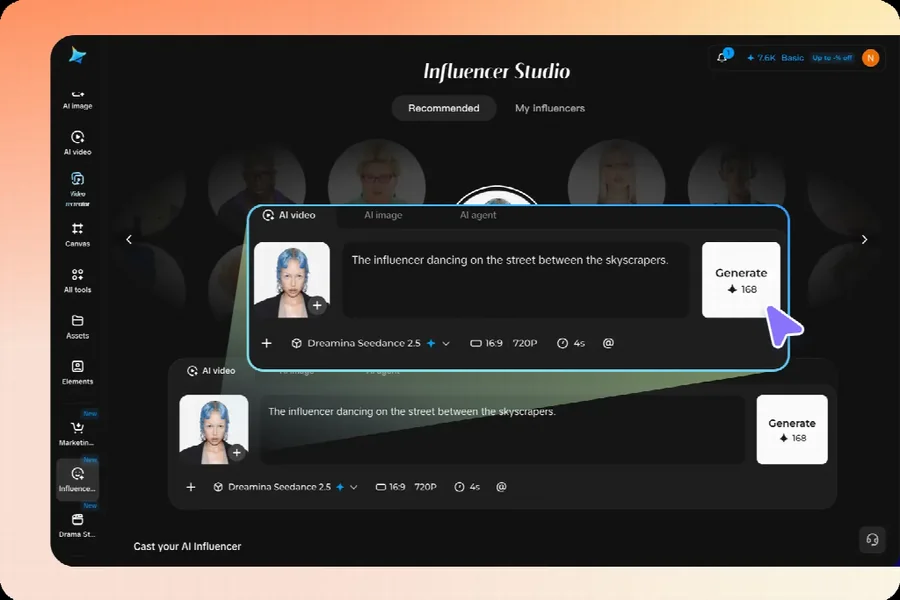
Start with a message before deciding on the scene. An image of Sol holding a sketchbook establishes a mood; a prompt such as “Choose three colours you noticed today and use them in a quick sketch” gives the audience something to try.
The character can introduce that prompt in an image, while the caption explains how readers might adapt it. Someone might sketch on paper, make a digital collage or simply note the colours. The content stays flexible instead of suggesting that everyone needs the same supplies or routine.
Use the saved character to explore a scene that supports the idea. A brief could describe Sol at an imagined desk with a sketchbook and leave space for a title. Add or correct the prompt as editable text when you need precise wording, and check the final image before sharing.
An imagined room is a creative setting, not a photograph of a real home. Make the fictional nature clear where a viewer might otherwise misunderstand, and do not imply that the character personally completed a real activity.
Explore different scenes while keeping a familiar host
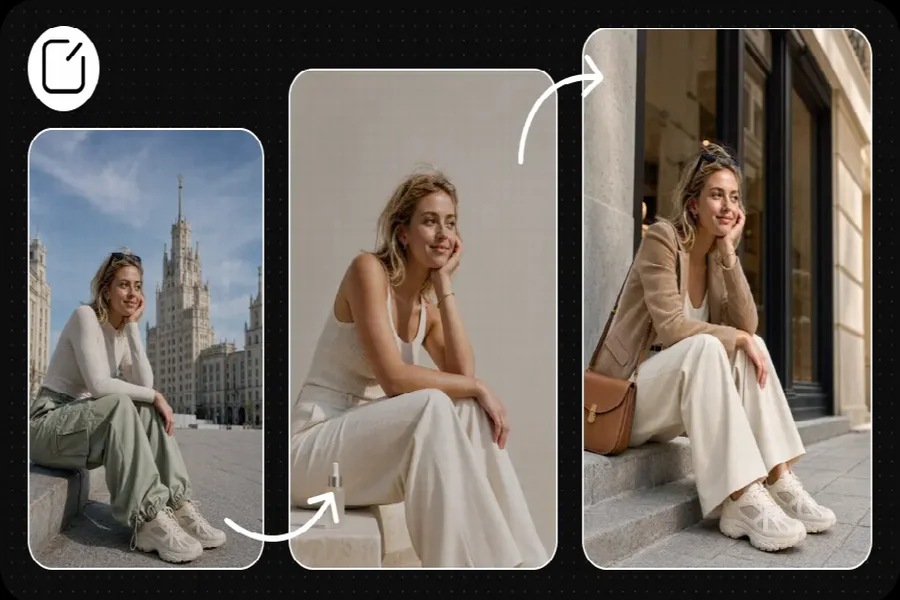
A lifestyle series can move between settings without requiring a new character each time. Sol might appear beside a window for a reading prompt, at a desk for a sketchbook idea and in a fictional park for a colour-observation activity.
Reuse the saved character as you explore each image. Keep the core description and change the setting or activity: for example, “Sol looking through a sketchbook at a desk” could become “Sol holding the sketchbook in an imagined garden.” Those are fictional scenes designed to support different ideas.
Compare the results with the original reference. Hair, clothing, accessories and proportions can change between generations, so check whether the character is still recognisable. If the sketchbook disappears or the style shifts unexpectedly, adjust the description or choose another draft.
Consistency does not require the same pose in every post. Keep the features that matter to the identity while allowing the setting, expression and composition to change with the idea.
Use a short series to give people a reason to return
A series can make a broad lifestyle idea easier to follow. For example, Sol’s creator might plan three posts around “finding a little room for creativity.” Each one can offer a different activity rather than repeating a similar portrait.
The first post could introduce a three-colour sketch prompt. The second could show an imagined sketchbook scene and suggest trying the colours in a simple pattern. The third could ask readers whether they prefer drawing, writing or making a collage.
Plan the visual and the takeaway together. The character provides continuity, while the prompt, example or question gives the audience a reason to look. If you share real responses in a later post, ask for permission where needed and do not invent comments or reactions.
You can use this structure for other subjects: a virtual reading host might introduce a theme, suggest a way to build a reading list and invite readers to share a favourite genre. A style host could explore a colour idea across several fictional outfits.
Turn a still image into a short lifestyle video
A short video can introduce a weekly theme, show a sequence of creative ideas or give a fictional visual story a beginning and an end. Start with a simple action that supports the message rather than asking the character to do everything at once.
For the sketchbook series, Sol could introduce the title “A three-colour idea for your weekend,” followed by a still or video scene featuring the saved character. The creator can add the actual instructions as readable text and use the caption for any details that need more space.
Use the character reference to explore the video, then watch the entire result. A face, hand, sketchbook or background may look right at the beginning and change during movement. If those changes distract from the idea, simplify the action or use a still image instead.
Preview the finished clip on a phone and check current platform requirements for size and duration. Keep the title readable, provide accurate captions for narration and choose a still cover that makes sense when the video is paused.
Introduce products without inventing a personal review
Some lifestyle creators or small businesses may want a virtual host to introduce a real product. That can be a visual presentation, but it should not imply the fictional character personally bought, used or tested the item.
Suppose Sol introduces a real notebook as part of a creative prompt. Use an authorised product image, check the actual size and page details, and make it clear whether the post is promotional. A generated scene may alter a cover, label or proportion, so compare the result with the real item.
If a claim concerns paper quality, durability or another product feature, support it with reliable information. Follow applicable advertising and platform disclosure requirements when there is a commercial relationship.
A lifestyle idea does not always need a shopping list. The sketch prompt can work with a reader’s existing supplies; a product introduction can be useful when it offers accurate details about a real item.
Keep inspiration separate from advice
Lifestyle content can touch on wellbeing, food, money and relationships. An appealing image or familiar character does not make a factual claim reliable.
A fictional host can suggest an optional creative activity, but it should not claim that a routine treats a health condition or will produce a particular result for everyone. Use appropriate sources and qualified review when discussing topics that require expertise.
Avoid inventing a personal transformation to make a post persuasive. A virtual character can introduce a journalling prompt without saying it overcame a real difficulty through journalling. The people behind the account remain responsible for what the caption and visual communicate.
Offer alternatives where appropriate. A reading break might happen on a bus, at home or in a few quiet minutes between tasks. A welcoming post gives readers room to adapt an idea to their own schedule and resources.
Plan a small batch and review it together
You do not need a month of content before trying the first idea. Choose three posts with different purposes: one introduces a useful prompt, one shows a fictional visual example and one invites a question or response.
For each post, note the message, the character reference, the setting, the text to add and any facts that need checking. If two ideas differ only in background, consider whether one can offer a clearer or more useful takeaway.
Place the finished images and videos side by side. Does the character remain recognisable? Does each post make sense on its own? Are fictional settings distinct from real product claims? Check spelling, captions and any visible text before publication.
After sharing, look at the questions people actually ask. A single view count cannot tell you why someone responded, but feedback may show whether the prompt was clear or whether viewers want another example. Use those observations to decide what to explore next.
Make the character part of the idea
An AI influencer can give lifestyle content a familiar visual thread without requiring the creator to appear in every scene. Saved character references and image or video variations can help bring different ideas into a series.
Start with a subject your audience cares about, give each post a useful or enjoyable purpose and keep fictional scenes and factual claims clear. The character makes the series recognisable; the thought behind each idea gives people a reason to return.

Passionate about exploring diverse ideas and sharing inspiration, I curate content that sparks curiosity and encourages personal growth. Join me at ElementalNest.com for insights across a wide range of topics.